
Want a smart assistant you can take anywhere without eating up your storage? Meet PocketPal! In this post, we’ll walk you through how to set up your very own portable AI right on your device.
Why Choose PocketPal?
- Lightweight & Efficient: Built on tiny LLMs, PocketPal is incredibly space-efficient, making it perfect for smooth performance on mobile devices.
- Versatile Performance: PocketPal handles a range of tasks, including text generation, language translation, and Q&A, acting as a handy sidekick for your daily workflow.
- Privacy First: PocketPal runs entirely offline. Your data stays on your device—no cloud uploads, no privacy concerns.
How to Build Your PocketPal Assistant:
1. Installation
- iOS Users: [Download from the App Store]
- Android Users: [Download from Google Play]
2. Download a Model
- Open the menu.
- Navigate to “Models”.
- Select your preferred model and tap download.
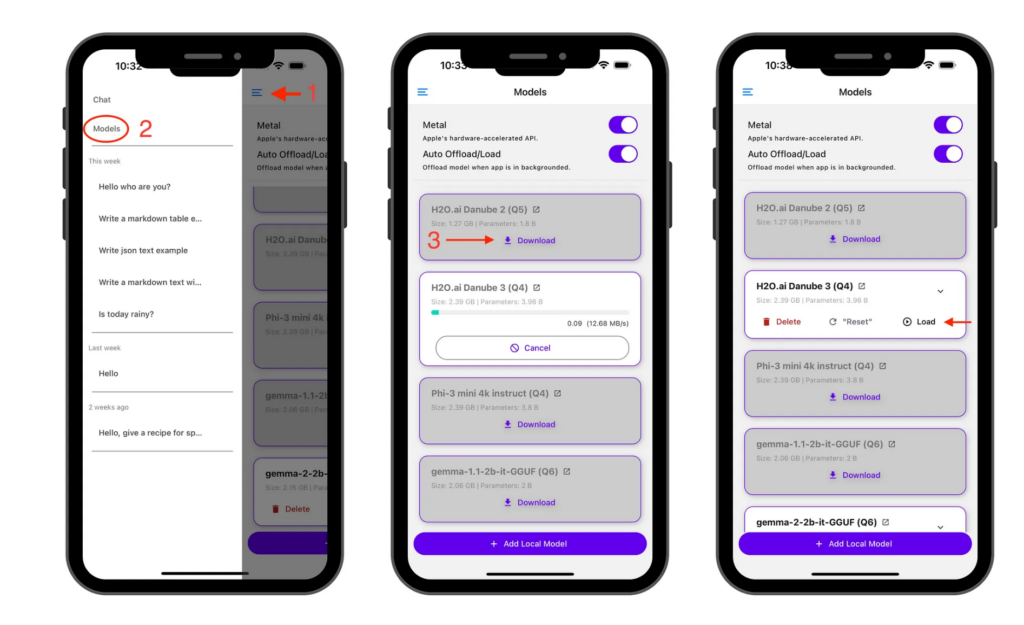
3. Load and Run
Once downloaded, simply hit “Load” to bring the model into memory, and you’re ready to start chatting!
Pro Tip:
PocketPal currently supports the latest Llama-3.2-3B-Instruct model. We highly recommend giving that one a try!
Use Cases for PocketPal:
- Personal Chatbot: Create a clean, responsive chatbot for tailored, private assistance.
- Voice Assistant: Pair it with voice recognition tech to build a smart, offline voice assistant.
- Translation Tool: Use it as a lightweight, real-time translator for seamless communication on the go.
- Writing Companion: Leverage AI for quick drafts, creative writing, or brainstorming sessions.