Introduction
OpenManus is a thrilling open-source project that empowers users to deploy AI agents directly on their local hardware, hooking into powerful Large Language Models (LLMs). This is a game-changer for anyone eager to experiment with cutting-edge AI without the overhead or privacy concerns of cloud-based services. This tutorial will walk you through the setup process on Windows or macOS, ensuring you get your local AI agent up and running in no time.
Deployment Steps
Here are two installation methods tailored to your operating system:
Method 1: Using Conda (Windows)
- Install Python 3.12 from the official website.
- Download and install Conda from here.
- Create a Conda environment:
conda create -n open_manus python=3.12 && conda activate open_manus - Clone the repository:
git clone https://github.com/mannaandpoem/openmanus && cd openmanus - Install dependencies:
pip install -r requirements.txt - Install and run your Ollama model, for example:
ollama run qwen2.5-coder:14b - Configure OpenManus:
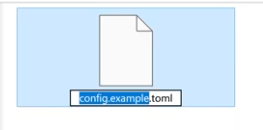
- Copy and rename the config file:
cp config/config.example.toml config/config.toml - Edit
config.tomlto set your model (e.g.,model = "qwen2.5-coder:14b") and base URL.
- Copy and rename the config file:
- Run:
python main.py
Method 2: Using uv (macOS)
- Install uv:
curl -LsSf https://astral.sh/uv/install.sh | sh - Clone the repository:
git clone https://github.com/mannaandpoem/openmanus && cd openmanus - Create and activate a virtual environment:
uv venv && source .venv/bin/activate - Install dependencies:
uv pip install -r requirements.txt - Install and run an Ollama model (steps same as above).
- Configure and run, referring to the Conda instructions.
Configuration Details
Edit the config.toml file to set your LLM parameters, base URL (e.g., http://localhost:11434/v1), and API keys. Example config:
model = "qwen2.5-coder:14b"
base_url = "http://localhost:11434/v1"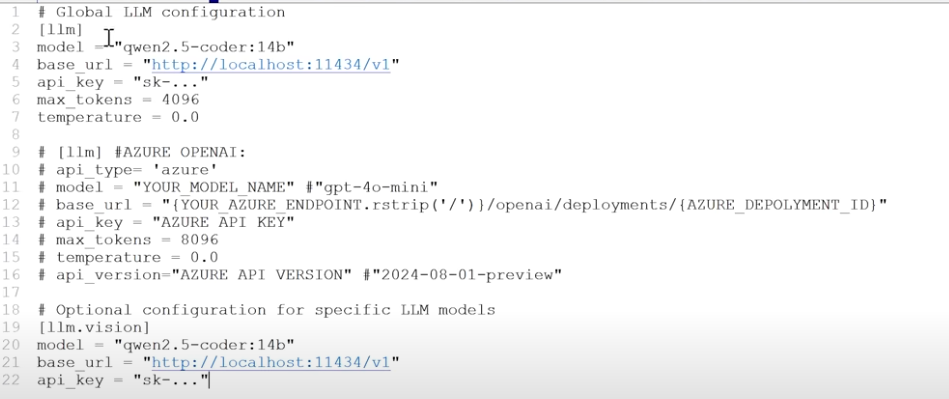
Running and Management
- Run application:
python main.py - Run development build:
python run_flow.py - Model management:
- List installed models:
ollama list - Remove model:
ollama rm model_name
- List installed models:
Deep Dive
Project Context
OpenManus is an open-source initiative designed to replicate the capabilities of Manus AI—a versatile agent capable of executing autonomous, complex tasks like travel planning and financial analysis. Built by contributors from the MetaGPT ecosystem using Python, JavaScript, and Docker, it offers a flexible framework for developing multi-agent AI systems. The project has gained massive momentum, already exceeding 3,300 stars on GitHub.
Prerequisites
To deploy OpenManus, you’ll need the following:
- Python 3.12: Grab the installer from the official site.
- Conda: Highly recommended for Windows users to manage dependencies.
- Ollama: The standard for running local LLMs; download it here.
- Supported Models: Tested with qwen2.5-coder:14b, qwen2.5-coder:14b-instruct-q5_K_S, qwen2.5-coder:32b, and minicpm-v.
Configuration & Management
All settings live in config/config.toml. Key parameters include:
- Model selection (e.g.,
"qwen2.5-coder:14b") - Base URL (typically
"http://localhost:11434/v1") - Hyperparameters:
max_tokens = 4096,temperature = 0.0, etc.
Community & Contributing
OpenManus thrives on community involvement. Reach out via email ([email protected]) or submit issues and PRs on GitHub. For community discussion groups, check the GitHub repository.
Special thanks to the projects that made this possible: anthropic-computer-use and MetaGPT. Licensed under MIT.
Conclusion
By following this guide, you can successfully host OpenManus locally and tap into the potential of autonomous AI agents. The project is moving fast, so keep an eye on the official GitHub repo for the latest features.